How to Buy Crypto on Bybit with Credit Card (Step-by-Step)
Buy Crypto on Bybit with Credit Card (Step-by-Step Guide)
Buying cryptocurrency with a credit card or debit card is one of the fastest ways to bridge traditional fiat currency into digital assets. When speed is critical—such as capitalizing on a fast-moving market move or funding a trade immediately—waiting 1 to 3 business days for a standard bank wire transfer is not an option.
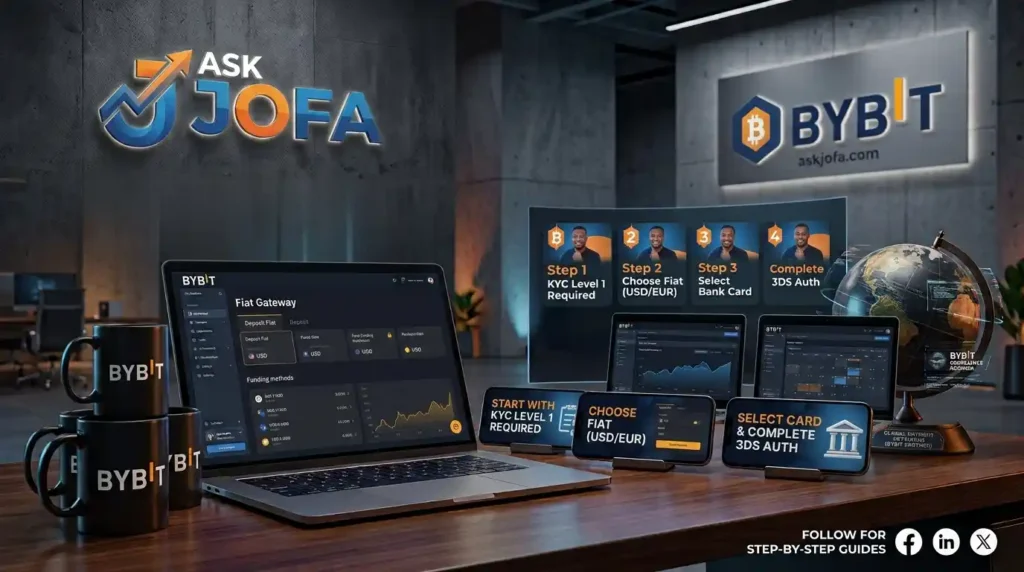
This comprehensive guide breaks down how to buy crypto on Bybit using a Visa or Mastercard step-by-step. It covers the mobile app execution flow shown in our video tutorial, identity verification (KYC) requirements, bank card support rules, 3D Secure (3DS) authentication protocols, regional transaction fee structures, and alternative funding solutions such as virtual dollar cards and P2P trading.
How to Buy Crypto on Bybit with Credit Card (Step-by-Step)
Watch the complete visual walkthrough below as demonstrated on the official Bybit mobile app:
☑️ ByBit Crypto Reward Bonus: 👉 Unlock Up to $10,000+ in FREE ByBit Bonus
Video Chapters & Key Timestamps
- 0:00 — Intro: How to Buy Crypto on Bybit with Credit Card
Overview of buying USDT and digital assets on the Bybit exchange app using a credit or debit card.
- 0:13 — Navigating to Deposit and Fiat Gateway on Bybit App
Step-by-step navigation to locate the Fiat Deposit area and check card availability in your region.
- 0:49 — KYC Level 1 Requirements & Card Support Detection
Understanding Bybit’s location detection and completing mandatory Individual KYC Level 1 verification.
- 1:10 — Selecting USDT Amount and Currency Options
Choosing your target cryptocurrency (USDT, BTC, ETH) and inputting your preferred purchase amount.
- 1:30 — Enabling 3DS Protocol & Bank OTP Verification
Why your credit/debit card must support 3D Secure (3DS) and international online transactions for OTP approval.
- 2:16 — Selecting Payment Method & Adding Visa or Mastercard
Selecting the Bank Card option, confirming account name matching rules, and entering card details. - 3:25 — AirTM Virtual Dollar Card Solution & Billing Address Setup
Using an AirTM virtual Visa card as an alternative payment method and entering bank-compliant billing addresses. - 4:14 — Transaction Fee Breakdown & P2P Alternative Strategy
Understanding Bybit card processing fees (1.1% – 3.05%) and exploring zero-fee P2P trading options. - 5:13 — Finalizing Card Purchase & Confirming Bybit Wallet Deposit
Submitting payment details, completing bank 3DS authorization, and verifying credited assets in your Bybit account.
What Is Bybit One-Click Buy?
Bybit’s One-Click Buy is an automated fiat gateway that converts fiat currencies (such as USD, EUR, GBP, NGN, or AED) directly into cryptocurrencies like Tether (USDT), Bitcoin (BTC), or Ethereum (ETH).
Unlike Peer-to-Peer (P2P) trading—where you manually transfer money to an individual seller off-platform and wait for them to release escrowed assets—One-Click Buy automates the transaction directly through regulated payment processors. Once authorized by your card issuer, the purchased cryptocurrency is immediately credited to your Bybit Funding Account.
| Gateway Feature | One-Click Buy (Bank Card) | Bybit P2P Trading | Standard Fiat Wire |
| Settlement Speed | Instant (seconds to minutes) | 5–15 minutes | 1–3 business days |
| Counterparty | Automated Payment Gateway | Individual P2P Merchant | Clearing Bank / Bybit |
| Fee Structure | 1.1% – 3.05% (varies by region/card) | 0% Exchange Fee (Zero Fee) | Fixed Wire/Bank Transfer Fee |
| Bank Block Risk | Moderate to High (Issuer Dependent) | Low (Local Bank Transfer) | Low (Direct Deposit) |
| Verification Level | Individual KYC Level 1 Required | Individual KYC Level 1 Required | Individual KYC Level 2 / Advanced |
Prerequisites Before Buying Crypto on Bybit
To prevent failed transactions or temporary account blocks, confirm these four core requirements before initiating a card checkout:
1. Bybit Identity Verification (KYC Level 1)
Bybit enforces mandatory Individual Identity Verification (KYC Level 1) for all fiat-to-crypto gateways.
- Requirements: Government-issued photo ID (Passport, Driver’s License, or National ID) and a real-time facial recognition scan (selfie).
- Processing Time: Usually verified automatically within 5 to 15 minutes.
- Important Restriction: Corporate or Business Verification accounts are not supported for individual bank card purchases.
2. Supported Card Schemes
Bybit supports Visa and Mastercard globally, as well as JCB across select Asian markets.
- Name Match Requirement: The cardholder’s legal name on the card must exactly match your KYC-verified name on Bybit. Third-party card payments are strictly prohibited by anti-money laundering (AML) protocols. Using a third-party card will cause the payment to fail and risks temporary asset freezing.
- Corporate Cards: Business or corporate credit cards are generally rejected by the gateway.
3. 3D Secure (3DS) Protocol & International Usage
Your card issuer must have 3D Secure (3DS) enabled.
- During checkout, the gateway triggers a security challenge requiring you to enter a One-Time Password (OTP) sent via SMS or approve a push notification inside your mobile banking app.
- The card must also be cleared by your bank for international and online e-commerce transactions.
4. Matching Billing Address Format
When linking a card, you must enter the billing address registered with your card-issuing bank. Enter the details using standard characters conforming to the ISO/IEC 8859-1 character set. Avoid using special symbols, non-Latin characters, or accents, as this cause Address Verification Service (AVS) mismatches.
- Open the Bybit Mobile App and log in to your account.
- On the home tab, locate the Deposit icon or tap More.
- Under the Recommended section, tap Buy Crypto.
- Select Fiat Deposit / Bank Card.
Note on Location Detection: If the Bank Card option appears in your menu, Bybit’s geolocation and IP detection have confirmed that card purchases are supported in your current region.
[Step 1 Visual: Bybit App Home -> Tap "More" -> Select "Buy Crypto" -> Tap "Fiat Deposit"]
Step 2: Select Asset Type and Spend Amount
- The default token for direct fiat purchases is USDT (Tether). If you wish to buy Bitcoin (BTC), Ethereum (ETH), or Solana (SOL), tap the dropdown menu to switch the asset.
- Enter the amount of fiat currency you wish to spend (e.g., $30 USD).
- The system will display the estimated amount of USDT you will receive based on real-time market rates.
[Step 2 Visual: Select USDT -> Enter $30 USD -> View Estimated Crypto Yield]
Step 3: Select Payment Method and Add Card
- Do not tap “Next” immediately—select Payment Method first.
- Choose Bank Card (Visa / Mastercard) from the list of options. Alternatively, if your card is already registered with Apple Pay or Google Pay, you can select those options.
- Tap Confirm, then select Add Card.
[Step 3 Visual: Select "Bank Card" -> Tap "Add Card"]
Step 4: Input Card Details and Billing Address
- Enter your 16-digit Card Number, Expiration Date, and 3-digit CVV/CVC code.
- Confirm that the cardholder name matches your verified Bybit KYC name.
- Enter your registered Billing Address (Street Address, City, Zip/Postal Code, and Country).
[Step 4 Visual: Enter Card Number, Expiry, CVV, and ISO-Compliant Billing Address]
Step 5: Complete 3DS Bank Authentication
- Tap Confirm to submit the purchase order. Note that the reference price quote refreshes every 30 seconds to adjust for live market volatility.
- The app will redirect to your bank’s 3D Secure (3DS) gateway.
- Check your mobile device for an SMS OTP code or open your bank’s mobile app to authorize the transaction.
- Once verified, the payment processes within seconds, and the purchased USDT lands directly in your Bybit Funding Account.
[Step 5 Visual: 3DS Bank OTP Prompt -> Transaction Approved -> USDT Credited to Funding Account]
Strategic Solution: AirTM Virtual Dollar Card
If your local bank restricts crypto purchases or declines international card transactions, using a dedicated virtual dollar card can resolve authorization failures.
The AirTM Virtual Dollar Card is a recommended solution for funding international gateways:
- Visa/Mastercard Network: Issued as a USD-denominated Visa card compatible with Bybit’s 3DS gateway.
- Transparent Billing Address: AirTM provides a registered USD billing address to ensure smooth Address Verification Service (AVS) checks.
- Easy Local Funding: Deposit local currency into your AirTM balance via local bank transfers or mobile wallets, convert it to USD, and fund the virtual card immediately.
Bybit Card Transaction Fees & Hidden Costs
When buying crypto with a credit or debit card, the total outlay consists of platform gateway charges and bank-side processing fees:
1. Bybit Gateway Fee Rates
Bybit charges a percentage-based processing fee depending on the regional classification of the card issuer:
- EU Issued Cards (Visa / Mastercard): ~1.10%
- Non-EU Issued Mastercard: ~2.70%
- Non-EU Issued Visa: ~3.05%
- Asian Issued JCB Cards: ~5.00%
- Apple Pay / Google Pay: ~1.80% + €0.24 fixed charge
2. Bank Issuer Cash Advance Charges (Crucial Warning)
Credit card purchases of crypto are frequently classified by issuing banks (such as Chase, Bank of America, or Barclays) as Cash Advances rather than standard merchant purchases.
- Cash Advance Fee: Banks often impose an immediate 3% to 5% flat surcharge.
- Immediate Interest Accrual: Cash advances carry no interest-free grace period; interest (often 20%–29% APR) begins accruing on the transaction date.
- No Rewards Points: Cash advance categories do not earn cashback or reward points.
Common Card Purchase Errors and Troubleshooting
| Error / Failure Symptom | Primary Cause | Recommended Resolution |
| Transaction Declined / Do Not Honor | Issuer-side security block on crypto processing. | Contact your bank to explicitly authorize transactions on Bybit, or switch to a virtual dollar card like AirTM. |
| 3DS Verification Timeout | Delayed SMS OTP delivery or network interruption. | Ensure your mobile line receives SMS prompts, or approve the prompt directly inside your bank’s mobile application. |
| Name Mismatch Error | Cardholder name does not match Bybit KYC profile. | Ensure you are using your own personal card. Third-party card payments are rejected by default. |
| Billing Address Rejection | Address contains special symbols or fails AVS match. | Re-enter your billing address using standard Latin characters (ISO/IEC 8859-1 format) without special punctuation. |
| Daily Limit Exceeded | Order exceeds bank or Bybit KYC spending thresholds. | Upgrade your Bybit account to Individual KYC Level 2 to increase daily spending limits to $50,000 USD. |
P2P Trading: The Zero-Fee Alternative
For cost-conscious traders looking to avoid the 1.1%–3.05% processing fees and bank cash advance surcharges, Bybit P2P Trading is an alternative.
+-----------------------------------------------------------------------+
|                       BYBIT P2P TRADING FLOW                         |
|                                                                       |
|  [Buyer] --- (Local Bank Transfer / Zero Fees) ---> [P2P Merchant]   |
|     |                                                     |           |
|     +---- [Escrow System Releases USDT] <-----------------+           |
|     v                                                                 |
|  [USDT Credited to Buyer's Bybit Funding Account]                     |
+-----------------------------------------------------------------------+
Why Choose Bybit P2P?
- Zero Processing Fees: Bybit charges 0% fees on P2P orders.
- Local Bank Integration: Pay merchants directly via standard domestic bank transfers, Instant EFT, or local e-wallets.
- No Cash Advance Surcharges: Because transfers go through local bank rails, credit card cash advance fees do not apply.
Frequently Asked Questions (FAQ)
Can I buy crypto on Bybit using a credit card without KYC?
No. Bybit requires at least Individual Identity Verification Level 1 (Government ID + Selfie) before accessing any fiat payment gateway, including card purchases.
How long does it take for crypto to arrive in my account after payment?
Card purchases process automatically. In most cases, the purchased USDT or BTC is credited to your Bybit Funding Account within 10 to 60 seconds after successful 3DS authorization.
How many bank cards can I link to my Bybit account?
You can link up to 5 bank cards simultaneously to your Bybit account. Note that unlinking and re-adding a card counts toward this total within a 180-day window.
What happens if my payment was deducted from my bank but the order timed out?
If your bank account was debited for an expired or failed order, Bybit automatically triggers a refund. The funds will return to your bank card balance within 7 to 14 business days depending on your bank’s settlement cycle.
Related Next-Step Guides
- Bybit P2P Walkthrough: How to buy USDT with local bank transfer at zero fees.
- AirTM Virtual Dollar Card Setup: How to create, fund, and connect an AirTM Visa card for global payments.
- Bybit Account Security: How to enable Google Authenticator (2FA) and anti-phishing codes to protect your assets.
Sources & Official References
- Bybit Help Center: How to Buy Coins with Bank Card via One-Click Buy (Updated Jan 2026).
- Bybit Product Documentation: Transaction Fees and Daily Purchase Limits for Fiat Gateways.
- Visa / Mastercard Compliance Rules: 3D Secure Protocols and Address Verification System (AVS) Guidelines for Digital Asset Transactions.

John Ajiboye
Founder, ASK JOFA Digital · Creator of ASK JOFA Fintech · Architect of LAAS™
John Ajiboye is a digital marketing strategist, former institutional banker with 19+ years of experience, and founder of ASK JOFA Digital. Holding an M.Sc. in Computer Science, he combines deep financial discipline, technical architecture, and video marketing to build predictable lead-acquisition engines.
John is the creator of ASK JOFA, a leading fintech education platform and YouTube channel with over 31,000 subscribers. His channel provides step-by-step tutorials on digital finance, payment gateways, hardware wallets, and crypto platforms. He has executed successful content and acquisition campaigns for international brands including AirTM, Bybit, Gate.io, OneKey, ApexPay, PST, and Spend.Net.
Building on his success with organic search and video marketing, John developed LAAS™ (Lead Authority & Acquisition System)—a framework designed to help SMEs, consultants, and professionals build multi-channel visibility across YouTube, search engines, AI answer engines (AEO/GEO), and LinkedIn.
Through ASK JOFA Digital, John transforms expertise into automated media assets that attract high-intent leads and build lasting market trust—without relying on short-lived ad spend or social media virality. His systems are engineered to produce clear, actionable outcomes: helping professionals Get Hired™, consultants Get Clients™, and SMEs Get Customers™.